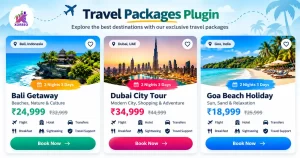
Premium Banner Slider is a lightweight WordPress plugin that helps you create attractive, responsive banner sliders with ease. Manage banners directly from your WordPress dashboard, upload desktop and mobile images, add titles, descriptions, and call-to-action buttons. Customize autoplay, transition speed, slider height, navigation arrows, and pagination dots. Use a simple shortcode to display your sliders anywhere on your website.
Premium Banner Slider 1.0
Installation
- In WordPress, open Plugins → Add New Plugin → Upload Plugin.
- Upload premium-banner- slider1.0
- Go to WordPress → Plugins → Add New Plugin → Upload Plugin.
- Upload the ZIP and activate it.
- Open Banner Slider → Add Image Banner.
- Upload and publish your images.
Featured
- 6 animation effects: Fade, Slide, Zoom, Ken Burns, Flip, and 3D-style Cube.
- Image-only banners with optional clickable links.
- Separate desktop and mobile images.
- Autoplay, navigation arrows, and pagination dots.
- Adjustable animation speed and slider height.
- WordPress admin image management and display ordering.
- Responsive layout and shortcode support.
Shortcode
[simple_banner_slider]
[simple_banner_slider effect=”zoom”]
[simple_banner_slider effect=”kenburns” height=”500″ interval=”6000″]
Premium Banner Slider 1.1
Installation
- In WordPress, open Plugins → Add New Plugin → Upload Plugin.
- Upload premium-banner- slider1.1
- Click Install Now, then Activate.
- Open Banner Slider → Add Image Banner.
- Upload your images, optionally set links, and publish each banner.
- Open Banner Slider → Settings to configure animation behavior.
Featured
- Random animation selection on slide changes, avoiding the same effect twice in a row where possible.
- 21 selectable Animate.css-style effects, including fade, zoom, slide, bounce, flip, rotate, and light-speed effects.
- Admin settings for animation mode, autoplay, interval, animation duration, desktop/mobile height, arrows, dots, and image fit.
- Desktop and optional mobile images, with optional banner links.
- Responsive layout, keyboard navigation, swipe gestures, and reduced-motion support.
Shortcode
[simple_banner_slider]
[simple_banner_slider effect=”random” height=”500″ mobile_height=”360″ interval=”6000″ speed=”1000″]
[simple_banner_slider effect=”zoomIn”]
Premium Banner Slider 1.2
Installation
- In WordPress, open Plugins → Add New Plugin → Upload Plugin.
- Upload premium-banner- slider1.2
- Navigate to Plugins → Add New Plugin → Upload Plugin.
- Choose the ZIP file, click Install Now, then click Activate Plugin.
- Open Banner Slider → Add New Banner in the WordPress dashboard.
- Create your banners, publish them, and insert the shortcode on the page where you want the slider.
Featured
- Main headline, using the WordPress post title
- Subtitle and description
- Main image and optional mobile image
- Button label and destination URL
- Optional clickable whole-banner link
- Open links in a new tab
- Text alignment, text color, and dark overlay
- Display order
Shortcode
Basic slider
[banner_slider]
Disable autoplay
[banner_slider autoplay=”0″]
Custom slider settings
[banner_slider autoplay=”1″ interval=”7000″ speed=”800″ height=”520″ mobile_height=”420″ arrows=”1″ dots=”1″]
Display only selected banners
Replace the example IDs with your actual banner post IDs.
[banner_slider ids=”12,15,18″]